EASY Gets an Update Ahead of Chillventa 2026: Here’s What’s New
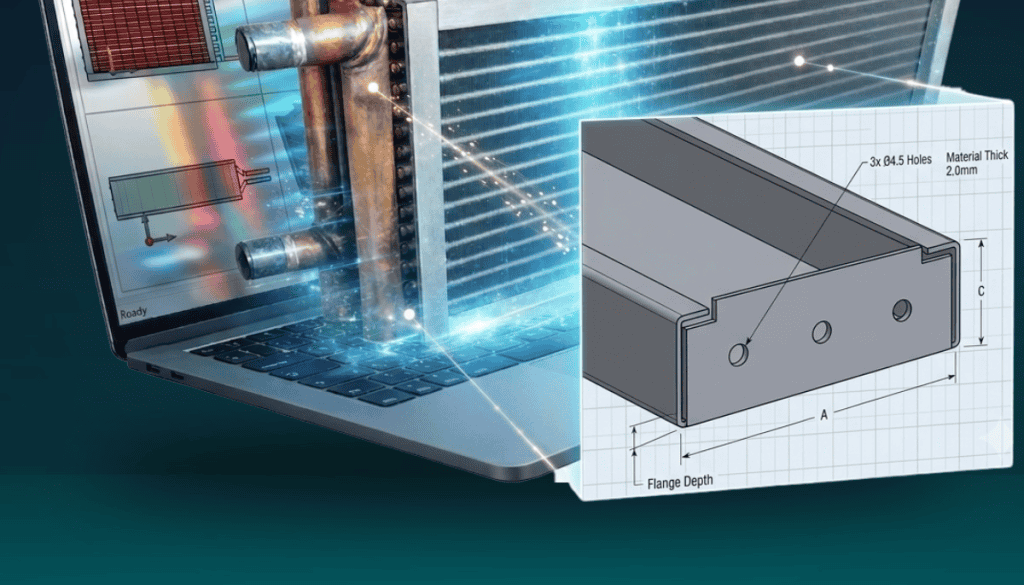
In just a few months, Unilab will be at Chillventa 2026 (October 13–15, Nuremberg, Hall 4, Booth 4-116), the world’s leading exhibition for refrigeration, air conditioning and heat pump technology. It will be the perfect opportunity to show, live, the latest evolution of EASY, Unilab’s design software for heat exchangers and finned coils: a release that introduces a brand-new tool for frame drilling — Rivet Holes — alongside a series of improvements designed to make everyday work in EASY faster and more precise.
In this article we walk through all the news, starting with the most anticipated feature.
Rivet Holes: rivet hole drilling becomes a tool of its own
Until now, placing rivet holes on frame profiles required manual calculations and often lengthy point-by-point work, especially on frames with many repeated holes. With this release, EASY introduces a dedicated panel — Rivet Holes — covering five workflows designed to handle everything from single-point placement to the generation of complex, corner-anchored patterns in a single step.
1. Manual placement
Select the frame part in the tree (for example “T-Top”), click “+ Add” and indicate the point on the profile: EASY automatically reads the click position and proposes the offset values (dx/dy) from the nearest reference corner. Values can be corrected by typing them directly before confirming with “Apply.” This is the best method for single holes or holes placed at non-regular positions.
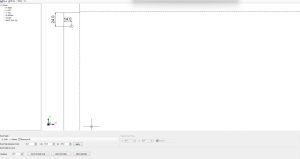
Manual placement: a rivet hole applied at the exact position dx = 14.0, dy = 24.0.
2. Manual + Repeat
Once a first hole has been placed manually, the “Repeat rivet holes” panel becomes active and lets you generate a row or column of holes at a fixed pitch: set the pitch on “dx” (horizontal row) or “dy” (vertical column) and click “Repeat” once for each additional hole. You can start several independent series on the same part, each with its own pitch.
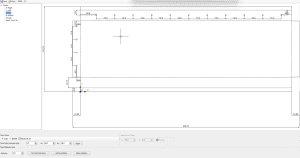
Manual + Repeat: a vertical column at 50.0 mm pitch and a horizontal row at 70.0 mm pitch generated on the same part.
3. Automatic distribution by zone
For regular drilling along an entire edge, the “Rivet holes by zone” mode automates the work: define the zone by clicking the two start and end points on the edge, set the desired spacing (distance), and EASY distributes the holes evenly, automatically computing equal margins at both ends. The result is shown as a preview before confirming with “Add rivet holes.”
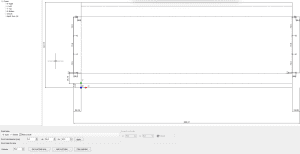
Automatic distribution by zone: the pattern committed on the edge, reproduced identically on the mirrored side.
4. Group moving
A row or column of holes generated with the zone distribution method can be repositioned as a single rigid group, without having to recreate it: simply select the series’ reference hole, edit its coordinates (dx/dy), and confirm with “Apply.” The entire series moves while keeping the spacing between holes unchanged.
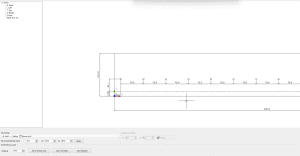
Group moving: the whole row has shifted together to a new reference position, keeping the 70.0 mm spacing.
5. Rivet Row: a complete row from a picked corner
The newest addition to the Rivet Holes toolkit builds a complete row of holes in a single step, anchored to a corner you pick on the part — no more clicking each hole one by one. In the “Rivet row” section, click “Pick corner” and select the corner to measure from: EASY reads its coordinates (for example “Corner: 823.2, 55”) and uses that point as the reference origin. From there, set “dx” and “dy” for the offset of the first hole from that corner (values can be negative, to move toward the inside of the part), “step dx” and “step dy” for the pitch between consecutive holes along each axis, and “n.” for how many holes the row should contain. Click “Apply,” and EASY generates the entire row in one shot, with dimension lines confirming both the offset and the pitch. Leaving “step dx” at 0 produces a vertical column, leaving “step dy” at 0 produces a horizontal row, and setting both produces a diagonal line of holes.
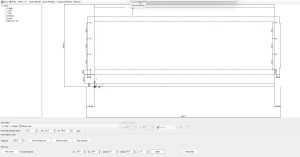
Rivet Row: a column of 4 holes generated at once on each side, 70.0 mm apart, offset 15.0 / 20.0 mm from the picked corner.
All five workflows are also fully integrated with the new Multi View feature (see below), making it easy to check hole placement across the frame, perforated surfaces and side edges at a glance.
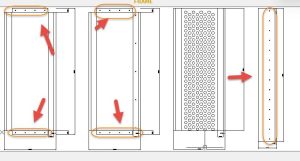
Typical rivet hole zones on a frame: top and bottom edges, a fully perforated body, and a vertical side edge.
New angular cutting parameters on the folds
Two new parameters have been added to frame parts, “angular cutting width” and “angular cutting height,” allowing a small cut to be set on the top and bottom folds (UP/DOWN fold). A targeted change, but a useful one for anyone managing more complex folding configurations without leaving EASY’s standard workflow.
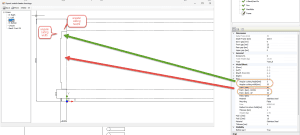
The new “angular cutting width” and “angular cutting height” parameters on the frame’s top fold.
Manifold protections (Manif. Prot. DX/SX)
Two new visibility parameters, “Manif. Prot. DX” and “Manif. Prot. SX,” are now available among the frame parts, enabling the generation of manifold protections on the right and left side of the exchanger. A new feature that completes sheet-metal management directly within the model, with no need for work outside the software.
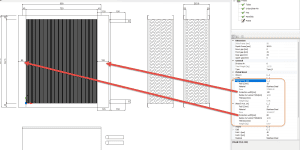
Manifold protections (DX/SX) generated directly in the model, shown across the different views.
Multi View: Frame, Circuits and Assembly in a single window
A new button, “Multi view,” has been added to the main screen, opening a window with three side-by-side views: Frame, Circuits and Assembly. From here you can:
- export all views to DWG or PDF with a single command, generating one file for each view;
- load a different titleblock for each view, or apply a single one to all of them by selecting the “Use same titleblock for all views” option.
A feature built for anyone who needs to produce a project’s complete technical documentation quickly, without manually generating and aligning individual drawings.
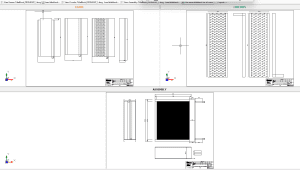
The Multi View window with a custom titleblock applied to the Frame, Circuits and Assembly views.
See us at Chillventa 2026
All of these updates will take center stage at our booth at Chillventa 2026, October 13–15 in Nuremberg — Hall 4, Booth 4-116. It’s the perfect opportunity to see EASY in action, try out the new Rivet Holes tool, and talk with our team about your specific production needs.
Chillventa 2026 | October 13–15 | Nuremberg, Germany | Hall 4, Booth 4-116
Want to book a meeting at the booth or request an EASY demo? Get in touch to arrange a time during the show.